Picking and pivots
A pivot is the point around which navigation rotates. Rotatrix chooses it using scene information supplied by the application: a pick locates geometry under a screen position, and bounds describe the extent of a model or selection.
The demos answer those geometry queries and display the pivot returned by Rotatrix. The integration supplies facts; Rotatrix’s navigation policy decides which fact to use.
Try it
Section titled “Try it”Run the demo, press D, then navigate over a cube and empty space. Click to select a cube and repeat. Compare reported hits and bounds with the scene. A green marker shows the server-supplied pivot using the shared disc appearance.
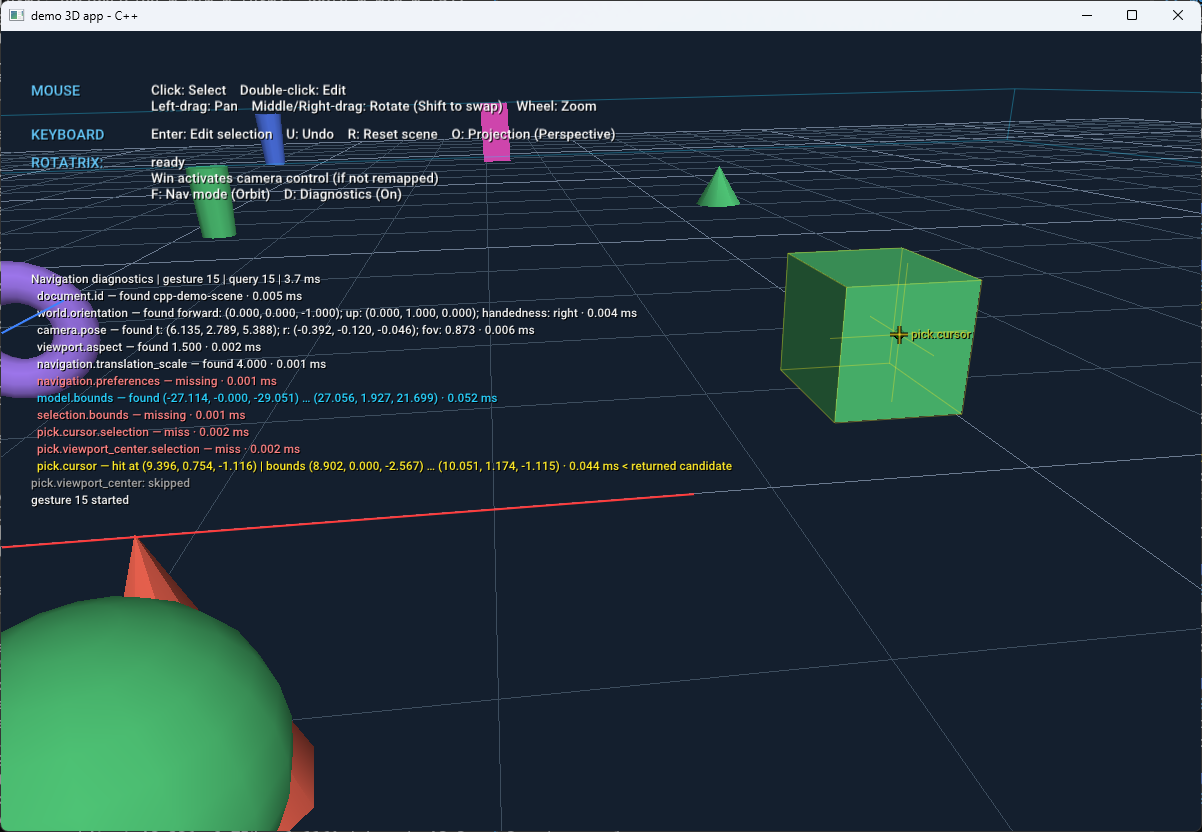
In this C++ demo capture, the 2D crosshair marks the screen position picked,
while the 3D crosshair marks the surface hit. The matching yellow pick.cursor
diagnostic row reports the hit’s world-space position and
the hit object’s bounds, and identifies it as the returned candidate.
pick.viewport_center is skipped because an earlier candidate supplied a result.
These crosshairs visualize the pick; the server-chosen pivot is displayed
separately as a green disc.
Repeat with the cursor outside the viewport and with tall and wide windows. Diagnostics identify evaluated alternatives; a skipped alternative needs a separate query or resolver test.
Query handling
Section titled “Query handling”NavigationSession calls the adapter’s query-capture method on the application thread. The capture saves camera, viewport size and cursor state. The SDK resolves requested facts lazily, stopping ordered alternatives at the first available result.
Capture live state on the thread required by the application API. Let the SDK complete the correlated response; do not send a second response from the adapter.
Resolve a pick only when requested and return an unavailable result when there is no hit. This lets Rotatrix try another source for the pivot. See the query result and completion contract for exact result values and low-level listener behavior.
The NavigationSession calls MyQueryCapture.resolve(self, name) with a requested fact name.
The integration guide’s query overview
shows how its constructor saves self.app, self.camera, viewport dimensions and
cursor. The resolver uses that saved state to answer each request.
bounds_value() converts application bounds to minimum and maximum world-space
points. UNAVAILABLE indicates that a requested fact cannot be supplied:
if name in ('model.bounds', 'selection.bounds'): return bounds_value(self.app.get_bounds(name == 'selection.bounds'))if name in ('pick.cursor', 'pick.cursor.selection', 'pick.viewport_center', 'pick.viewport_center.selection'): pixel = self.cursor if name.startswith('pick.cursor') else (self.width/2, self.height/2) if (pixel is None or not (0 <= pixel[0] < self.width and 0 <= pixel[1] < self.height) or (name.endswith('.selection') and self.app.selected is None)): return UNAVAILABLE hit = self.app.pick(pixel, selection_only=name.endswith('.selection')) if hit is not None: _, point, box = hit return {'point': point, 'bounds': bounds_value((box.minimum, box.maximum)), 'markerPosition': pixel} return {'markerPosition': pixel}return UNAVAILABLEInside MyQueryCapture.Resolve, this branch handles the pick fact after the
camera and bounds cases. app, cursor and viewport dimensions were captured
for this query. The other resolver branches are omitted.
if (name is "pick.cursor" or "pick.cursor.selection" or "pick.viewport_center" or "pick.viewport_center.selection"){ Point? pixel = name.StartsWith("pick.cursor") ? cursor : new Point(width / 2, height / 2); if (pixel is Point point && point.X >= 0 && point.X < width && point.Y >= 0 && point.Y < height && (!name.EndsWith(".selection") || app.Selected >= 0)) { var hit = app.Pick(point, name.EndsWith(".selection")); if (hit != null) return new Dictionary<string, object> { ["markerPosition"] = new[] { point.X, point.Y }, ["point"] = Values.Vector(hit.Position), ["bounds"] = Values.Bounds(hit.Bounds) }; return new Dictionary<string, object> { ["markerPosition"] = new[] { point.X, point.Y } }; }}MyQueryCapture saves camera, dimensions and cursor for one query. The
application supplies the picker and world-space bounds. Inside resolve(name),
after identifying a requested pick fact, this branch uses the captured cursor
or center position:
const pixel: [number, number] | undefined = name.startsWith("pick.cursor") ? this.cursor : [this.width / 2, this.height / 2];if (!pixel) return UNAVAILABLE;const sample = this.app.pick(pixel, name.endsWith(".selection"));return sample.ray ? { ...sample.hit, markerPosition: pixel } : UNAVAILABLE;MyQueryCapture::resolve resolves each fact synchronously during the scheduled navigation drain. The session memoizes repeated facts within a query and preserves first short-circuiting. Because the demo does not yield or pump native events during fact resolution, camera, cursor and selection remain consistent for that query.
| Query | Application operation |
|---|---|
| pick.cursor | Pick through the cursor, provided it is inside the viewport. |
| pick.viewport_center | Pick through the viewport center independently of the cursor. |
| Either name with .selection | Restrict the pick to selected geometry. |
| model.bounds / selection.bounds | Return scene or selection world-space bounds. |
Perform picking only when the resolver requests it. An unavailable cursor, selection or hit lets the server try its next candidate. Viewport cursor values use normalized [-1, 1] coordinates, with Y up; the native picker uses its own pixel coordinates.
MyApplication.pick() in application.py uses Panda3D collision picking and returns a world-space point and transformed bounds. A tested miss returns only markerPosition; a skipped test returns UNAVAILABLE. The SDK collects the marker from the result and omits it from the wire response.
The application API returns world-space hit points and transformed bounds.
Selection-only picking filters out unselected objects. Tested misses return only
markerPosition; skipped tests return NavigationQuery.Unavailable. The pivot marker is excluded from both picking
and bounds. Picking uses the same screen coordinates as raylib input and rendering.
MyApplication.pick(pixel, selectionOnly) receives viewport-relative pixels with Y down. Return a world-space hit or undefined; restrict selection-only picks to selected geometry. bounds must include object transforms. Exclude pivot and diagnostic graphics from both operations. A center pick still works when the cursor is outside the viewport.
The C++ application ray-tests the shared scene’s actual triangles and optional ground plane. Its integration supplies all four cursor/center and selection-only pick facts and model/selection/object bounds. Tested misses return only markerPosition; skipped tests return JSON null. Returned points and bounds are in world space; marker coordinates are local renderer metadata stripped from the wire response. Visual pivot geometry is excluded from picking.
Choosing a native picking operation
Section titled “Choosing a native picking operation”Use the application’s native hit-test API, a geometric raycast, or an equivalent operation that produces the requested world-space surface hit. When supported, visible bounded construction or datum planes and an active sketch plane can participate. Within the applicable candidate set, prevent back faces of closed solids from winning through foreground geometry. Selection-only queries first restrict that candidate set to selected geometry; unselected geometry does not occlude those hits.
Keep each result tied to its query snapshot. Do not recompute the selected fact during a gesture unless the server queries it again. Returned optional bounds describe the hit object or body, not an unrelated object or the entire selection.
Pivot display
Section titled “Pivot display”The marker shows the pivot Rotatrix actually chose, which can differ from the
geometry under the cursor. NavigationSession passes that point to the adapter
for display in the captured viewport. It later passes no point to clear the
marker when navigation is cleaned up.
The NavigationSession calls MyNavigationAdapter.show_pivot() with the captured
MyApplication as context, and a world-space point or
None as point:
def show_pivot(self, context, point): context.set_pivot_marker(point)View full implementation: MyNavigationAdapter.show_pivot →
The application’s set_pivot_marker() displays the point; None clears it.
public void ShowPivot(object context, Vec3? point) => app.ShowPivot(point);View full implementation: MyNavigationAdapter.ShowPivot →
app.ShowPivot() displays the point; null removes the marker.
MyNavigationAdapter.showPivot() delegates to the application’s display API.
The point belongs to the captured viewport; undefined clears the marker.
showPivot(context: MyApplication, point: Vec3 | undefined) { context.showPivot(point);}pivot(std::optional<Vec3>) stores or clears the green camera marker and updates the application’s orbit target when present. The SDK clears it on retirement. The demo also implements object_pivot and draws both using the standard marker. Its SDK diagnostic collector supplies the separate subdued labeled pick crosshairs and bounds.
void show_pivot(const NavigationContext &context, std::optional<Vec3> point) override { if (point && !is_current(context)) return; app.pivot = point; if (point) app.target = *point;}See pivot display guidance when adapting the display to your application.
Verification
Section titled “Verification”Check cursor/center independence, selection filtering, transformed bounds and picks, both projections, and portrait/landscape aspect ratios. Validate native display scaling and split viewports in your target application. A behind-eye pivot in orthographic view is currently rejected by the server.
For automated commands and coverage, use the demo READMEs: Python, C#, TypeScript, and C++.