OpenAxis SDK
OpenAxis lets you add Rotatrix control to your application. For a CAD or 3D application, it provides camera and object navigation that follows the user’s Rotatrix controls. For other uses, it supplies input rates that your application can interpret.
Rotatrix controls the demo application’s camera; diagnostics near the end show the scene queries behind the movement.
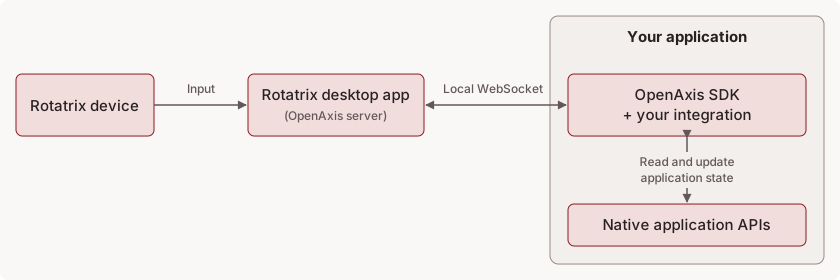
The Rotatrix device sends input to the Rotatrix desktop app, which runs the OpenAxis server. Your application connects to that server over a local WebSocket using an OpenAxis SDK. You write the integration that connects the SDK to your application’s APIs, either as a plugin or directly in the application’s code.
Choose an interface
Section titled “Choose an interface”The same connection supports two ways to consume input. Choose based on who should interpret the movement:
| Interface | What your application receives | What you implement |
|---|---|---|
| Navigation | Camera and object poses computed by the Rotatrix server | Report camera/scene information and apply the resulting poses through native APIs |
| Axis Streaming | Logical axis rates for your application to interpret | Decide how input affects your application |
Choose Navigation for camera and object control in 3D applications. Rotatrix provides consistent navigation behavior, including choosing the pivot—the point around which movement rotates. Your integration reports camera and scene facts, such as selection bounds and geometry under the cursor, as available. Rotatrix uses those facts to compute camera or object poses (positions and orientations). Your integration applies the poses through native APIs, and your application renders the result.
Choose Axis Streaming when your application should interpret the input, for example when adjusting a non-navigation parameter. Your integration receives named axis rates and defines how they change the application.
An integration can use either interface or both through the same connection.
How the SDK helps
Section titled “How the SDK helps”The SDK handles protocol messages and coordinates navigation requests so your integration can work with application-level operations: reading a camera, answering a scene query, or applying a pose.
| Responsibility | The SDK provides | Your integration supplies |
|---|---|---|
| Communication, for either interface | OpenAxisClient exchanges messages; OpenAxisConnectionManager handles reconnects and reannounces application metadata | Application identity and focus, plus startup and shutdown hooks |
| Axis Streaming | Callbacks delivering named axis rates | The behavior that turns those rates into application changes |
| Navigation | NavigationSession handles scene queries, pose ordering, corrections and cancellation | An adapter that reads scene facts and applies poses through native APIs, with scheduling on the application’s permitted thread |
For example, to navigate a CAD viewport, your adapter reads its camera and updates it when the SDK delivers a pose. Rotatrix computes the navigation; the SDK coordinates its delivery; your integration handles the native camera API and the viewport’s lifetime. The Navigation integration guide shows how these pieces connect.
Try it, then build
Section titled “Try it, then build”To try device input, connect a Rotatrix device and start the Rotatrix desktop app. OpenAxis 1.0 and later require Rotatrix 1.6.0 or newer. See compatibility and language support for protocol support.
Open the browser 3D demo to explore the scene, then follow the demo controls to try navigation with Rotatrix. You can also explore the scene with the demo’s mouse controls without a device.
Choose a quickstart to try input in Python, C#, TypeScript or C++:
- Navigation quickstart: run a 3D demo, move its camera with Rotatrix, and try the controls.
- Axis Streaming quickstart: receive named input rates, then follow subscriptions and callbacks that interpret them.
Language tabs retain your choice between pages. Use SDK installation when you need package, source-embedding or runtime setup details.
After the quickstart
Section titled “After the quickstart”Follow the Navigation integration guide to adapt the demo code to your application. It covers component responsibilities, adapters, scene queries and setup.
Common tasks apply to Navigation, Axis Streaming and applications using both. Add connection recovery and shutdown, publish application context and focus, or configure session logs as you adapt the example to your host.
Navigation features cover camera and object integration: picking, concurrent input, editing and diagnostic overlays. Use the integration checklist to validate the adapted host. Read coordinates when converting native camera values, and reconciliation when combining Rotatrix navigation with native input or application constraints.
For Axis Streaming, adapt the frame callback to your application’s behavior and use the quickstart’s stream checks.
Compatibility and language support · Protocol specification · Interactive demos · Source on GitHub
Licensing
Section titled “Licensing”OpenAxis is dual-licensed under ELv2 or GPLv3. Integrations for proprietary applications must use the SDK under ELv2. See legal notices for details.