Coordinates and camera poses
Navigation facts and output poses use the application’s world coordinate system.
The integration reports that system through world.orientation; it does not
need to convert the entire scene to a universal world axis convention.
A fixed-coordinate application can return a constant world.orientation.
If the world basis or semantic Front direction is configurable, read it for
each query snapshot and keep it consistent with the other reported facts.
An integration works with three spaces: world coordinates for geometry and poses, camera-local axes for orientation, and viewport coordinates for cursor positions. Keeping these spaces distinct prevents reversed motion, incorrect pivots and aspect-dependent picking errors.
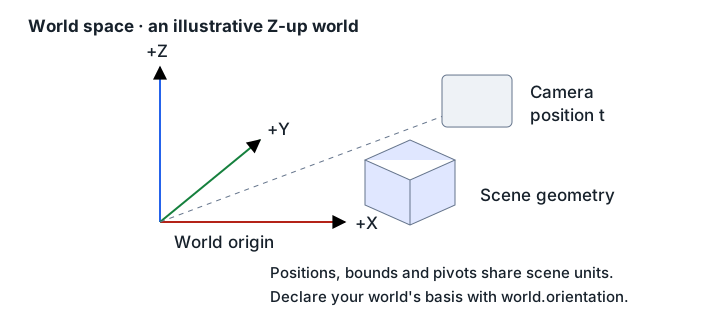
Position and rotation
Section titled “Position and rotation”t = [x, y, z] is a world-space position in application scene units. Bounds,
pivots, orthographic extents, and navigation translations use those same units.
All geometric components must be finite.
r = [rx, ry, rz] is a rotation vector: its direction is the rotation axis
and its length is the angle in radians. It is not an Euler-angle triple. Compose
orientations using rotation matrices or quaternions, not component addition.
Object orientation is relative to the bound target’s chosen identity frame. Camera identity rotation does not mean the application’s semantic Front view.
Camera axes and handedness
Section titled “Camera axes and handedness”The camera’s semantic axes are right, up, and backward; its forward direction is negative backward. A pose describes how those local axes are oriented in the application’s world. World handedness affects the right axis as shown below.
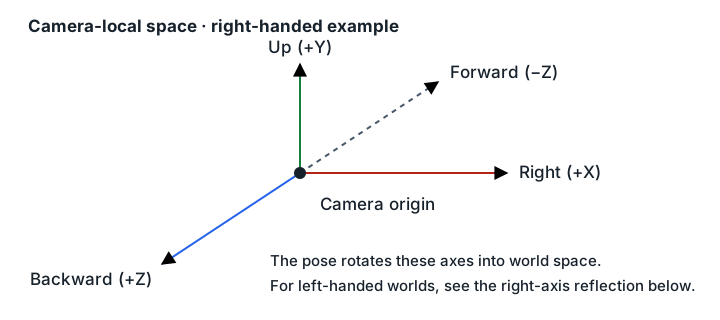
Let A = Exp(r) use the ordinary right-handed numeric
rotation-vector exponential, and let h be +1 for a right-handed world or -1
for a left-handed world:
camera_right = h * A * [1, 0, 0]camera_up = A * [0, 1, 0]camera_backward = A * [0, 0, 1]camera_forward = -camera_backwardThe handedness reflection is separate because a rotation vector can represent only a proper rotation. A native camera quaternion is therefore not necessarily usable directly: native local axes or handedness may differ.
For an eye/target/up camera, the SDK geometry helpers provide conversions. The
underlying construction normalizes backward = eye - target, makes up
orthogonal to backward, then forms the numeric rotation basis from
[up × backward, up, backward].
Python’s openaxis.geometry.CameraPoseValue contains detached t and r
triples and optional fov or ortho_extent. The look-at helpers use this
protocol-neutral value; convert explicitly to/from openaxis.types.CameraPose
at the navigation adapter boundary. Construction validates finite coordinates
and positive finite projection values, rejects two projections, and permits
omitting projection for geometry-only calculations. C# and TypeScript likewise
use a separate CameraPoseValue, with named position and rotation-vector fields.
All three geometry libraries also provide quaternion spherical interpolation:
Python/TypeScript Quat.slerp and C# Quat.Slerp.
Projection describes the rendered view
Section titled “Projection describes the rendered view”Every camera pose includes exactly one of:
| Field | Meaning |
|---|---|
fov | Vertical perspective field of view, in radians |
ortho_extent | Full visible vertical extent in world units, from bottom to top |
An application’s “zoom”, half-height, or scale parameter is not automatically
ortho_extent. Derive the visible extent from the actual model-to-viewport
transform. Use a documented full vertical world extent directly, or double a
documented vertical half-extent. A dimensionless zoom factor needs conversion
through the native projection. Likewise, convert horizontal FOV to vertical
FOV if necessary.
This distinction matters in portrait viewports. Some applications adjust the rendered vertical span as the viewport aspect changes even though their stored camera parameter does not change. Read and write conversions must account for that behavior consistently.
Screen coordinates are a separate space
Section titled “Screen coordinates are a separate space”viewport.aspect is renderable width divided by renderable height, excluding
toolbars and other surrounding UI.
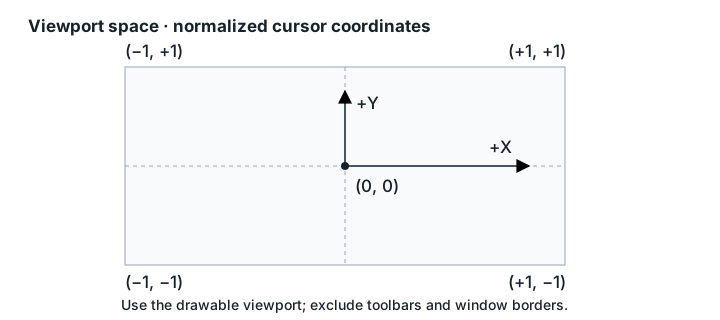
viewport.cursor uses normalized coordinates:
| Location | Coordinates |
|---|---|
| Center | (0, 0) |
| Bottom-left | (-1, -1) |
| Top-right | (1, 1) |
Normalize the two axes independently against the same renderable viewport. Positive X is screen-right and positive Y is screen-up, regardless of world handedness or the native pixel origin. Report unavailable when the cursor is outside that viewport; do not clamp it to an edge or substitute the center.
Native picking may need pixel coordinates. That conversion remains in the integration; the wire facts describe viewport coordinates or world-space hits. Use the same viewport transform for picking and overlays to avoid aspect- or DPI-dependent disagreement.
For the adapter callback surface, see the navigation adapter reference.
C++ openaxis::Pose stores t, rotation-vector r, and projection fields fov
or ortho_extent. geometry.hpp provides pose_from_look_at, look_at_from_pose,
camera_basis and Quat::from_rotvec; compose quaternion rotations rather than
adding rotation vectors. The C++ reference scene uses +Y up and -Z forward.